Stop rewriting your CV for every posting.
Paste the posting. A tailored CV, a cover letter, and interview prep come back, all drawn from work you've already done. Nothing reaches your CV until you approve it.
Free: 3 applications a month, each with a cover letter and interview prep. No card. Start with the PDF or DOCX you already have, under 10MB.
xadaro.com/applications
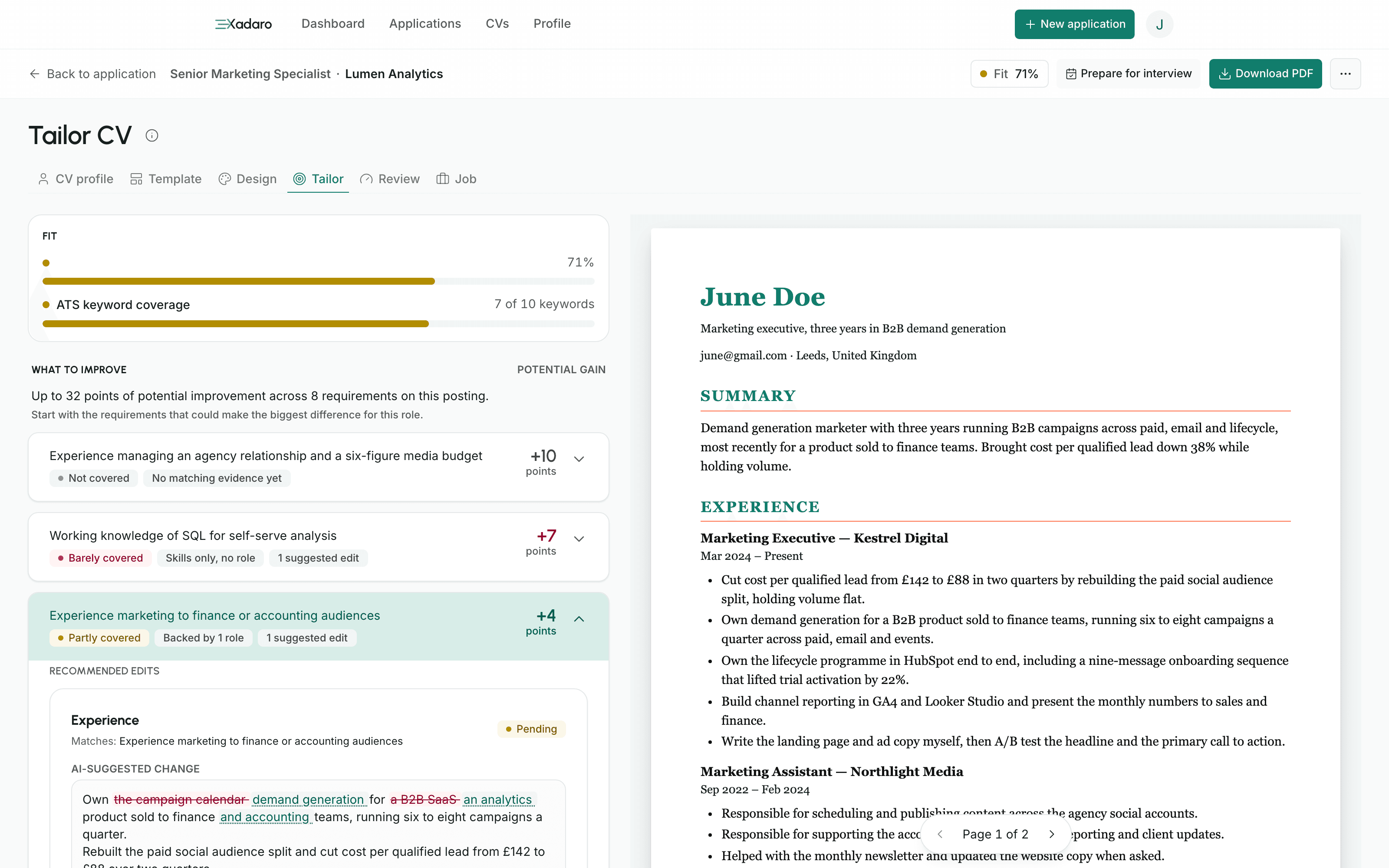
You've rewritten this CV nine times
Every posting wants the same history from a different angle. So you retype the CV, start the letter at a blank page, and lose a Sunday to a spreadsheet you'll stop updating by week 3. Xadaro takes the retyping, the blank page, and the tracking. It leaves you the judgement: which roles are worth it, what represents you, and when to send.
Bring the experience you have. It's more than you think.
Xadaro works from what's on your profile, whatever shape your history is in.
Applying for your first role
Coursework, placements, side projects, and part-time work all count as evidence here, and the drafts stay honest about how much of it you have.
Applying around a full-time job
Paste the next posting at 11pm and read a draft, instead of rebuilding the same context from scratch after a long day.
Coming back after time out
Bring forward the experience that still answers the role. Your dates stay as you entered them, and you decide how to explain the time away.
4 steps, and you decide at each one
No suggestion reaches a document you send until you accept it.
Add your CV
Upload a PDF or DOCX, check what Xadaro reads, and correct anything before it reaches your profile.
Paste the job posting
Paste the text or URL, then check the requirements, responsibilities, preferred qualifications, and keywords Xadaro finds.
Read the verdicts
Each requirement is marked Well covered, Partly covered, Barely covered, or Not covered. Open a row in the gap analysis to see the roles and skills it names.
Decide, then download
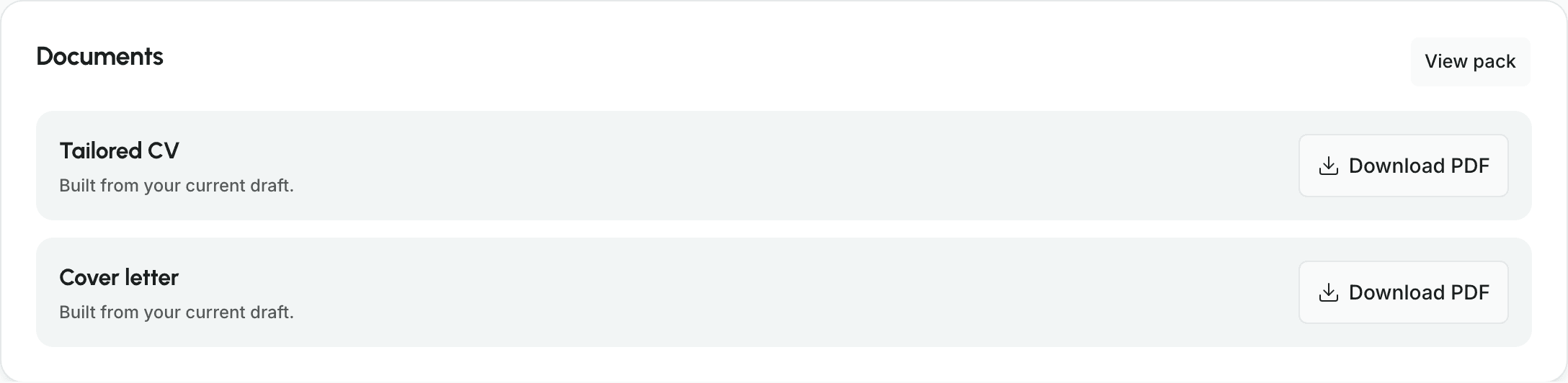
Accept, edit, or reject each rewrite. Download the tailored CV as a PDF, then take the letter as a PDF or plain text.
1 posting in. 2 documents and your interview prep out.
All 3 on the Free plan, and the letter and the prep both draw on the CV rewrites you accept.
A tailored CV
A job-specific copy carrying only the rewrites you approved. Your profile stays exactly as it was.
A cover letter
Drafted from those same accepted changes, so both documents argue one case. Pick a tone, edit it, paste it into the email.
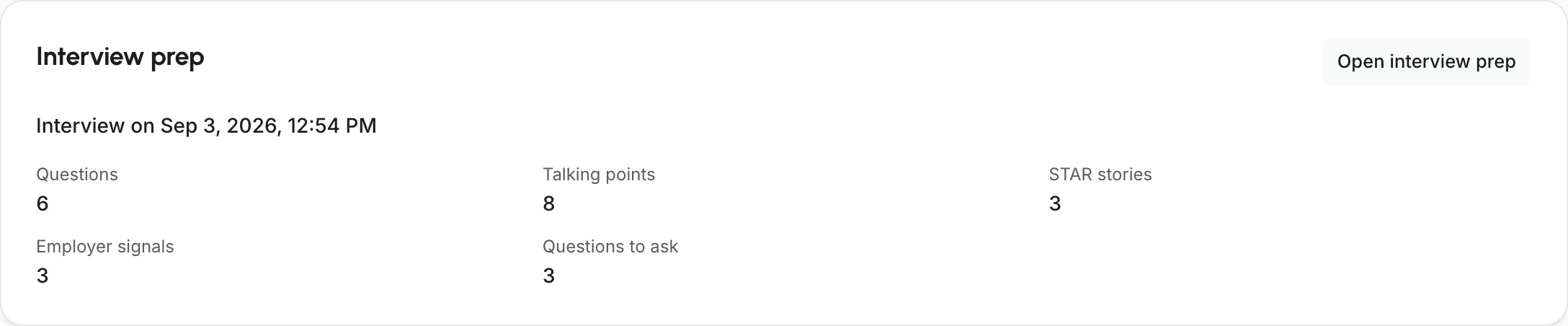
Interview prep
The questions this posting points at, the talking points under each one, and STAR stories from your own roles. Hide the talking points and answer cold.
xadaro.com/applications
The draft is written for you. The decisions are yours.
Every draft starts with your own profile, the posting when there is one, and any career context you chose to add. You can check the evidence and decide what belongs in the final document.
A verdict, and the count behind it
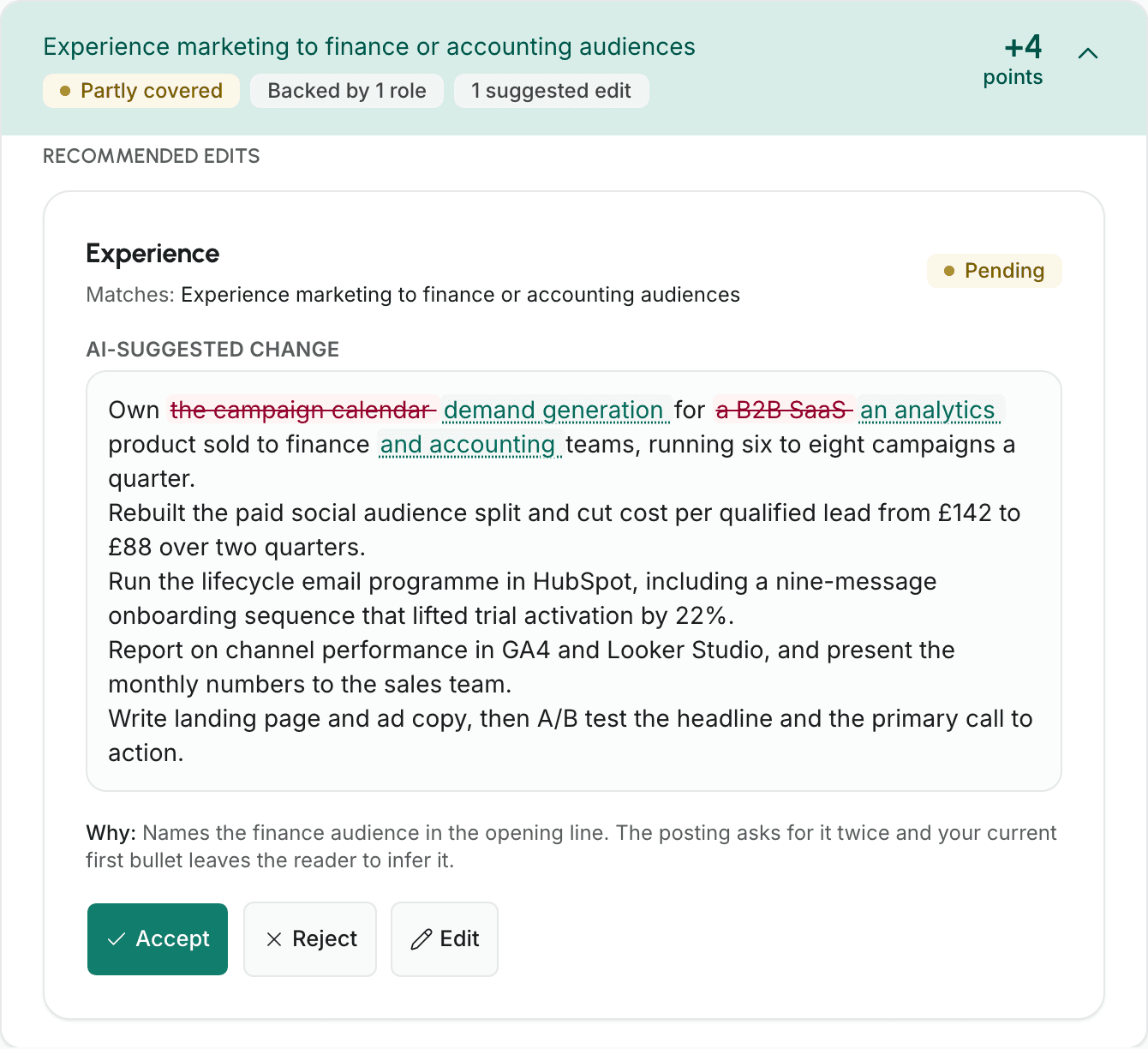
The row carries a verdict of Well covered, Partly covered, Barely covered, or Not covered, and beside it the count: "Backed by 3 roles", or "No matching evidence yet" when nothing does. Open the row in the gap analysis to see the roles and skills it names.
Accept, edit, or reject. Then change your mind.
The change is shown word by word, with anything it replaces struck through. Reject one now and you can still accept it later.
Flagged, or dropped
An uncertain tailoring suggestion stays visible with a warning attached. In a CV review, a rewrite that adds a date, a figure, or a company name your CV doesn't support is dropped before you see it.
A score you can take apart
This is Xadaro's own check: how machine-readable your tailored CV is, and how well it covers the posting. Out of 100: required sections 30, keyword coverage 30, parseable dates 20, contact block 15, and machine-readable structure 5. Partial checks earn half points, rounded up. It is arithmetic, not a model: the same CV against the same posting scores the same every time.
You could paste all of this into a chat window
Plenty of people do. Here's what the chat window can't hand back.
Structure in, structure out
Xadaro works from your profile and turns the posting into requirements before it drafts. Where a rewrite answers a requirement, it names it.
A verdict you can check
A chat window hands you prose. Here each requirement comes back marked Well covered, Partly covered, Barely covered, or Not covered, and opening its row in the gap analysis names the roles and skills behind the verdict.
Controls, not a scroll of prose
Review each rewrite on its own. Accept it, edit it, reject it, or reopen an earlier decision.
A pledge a chat window does not make
What you paste into a free chat window may be used to train a model. We don't train models on your content, and the privacy policy sets out what we do keep and for how long.
xadaro.com/applications
Set your search once. New matches land on your dashboard.
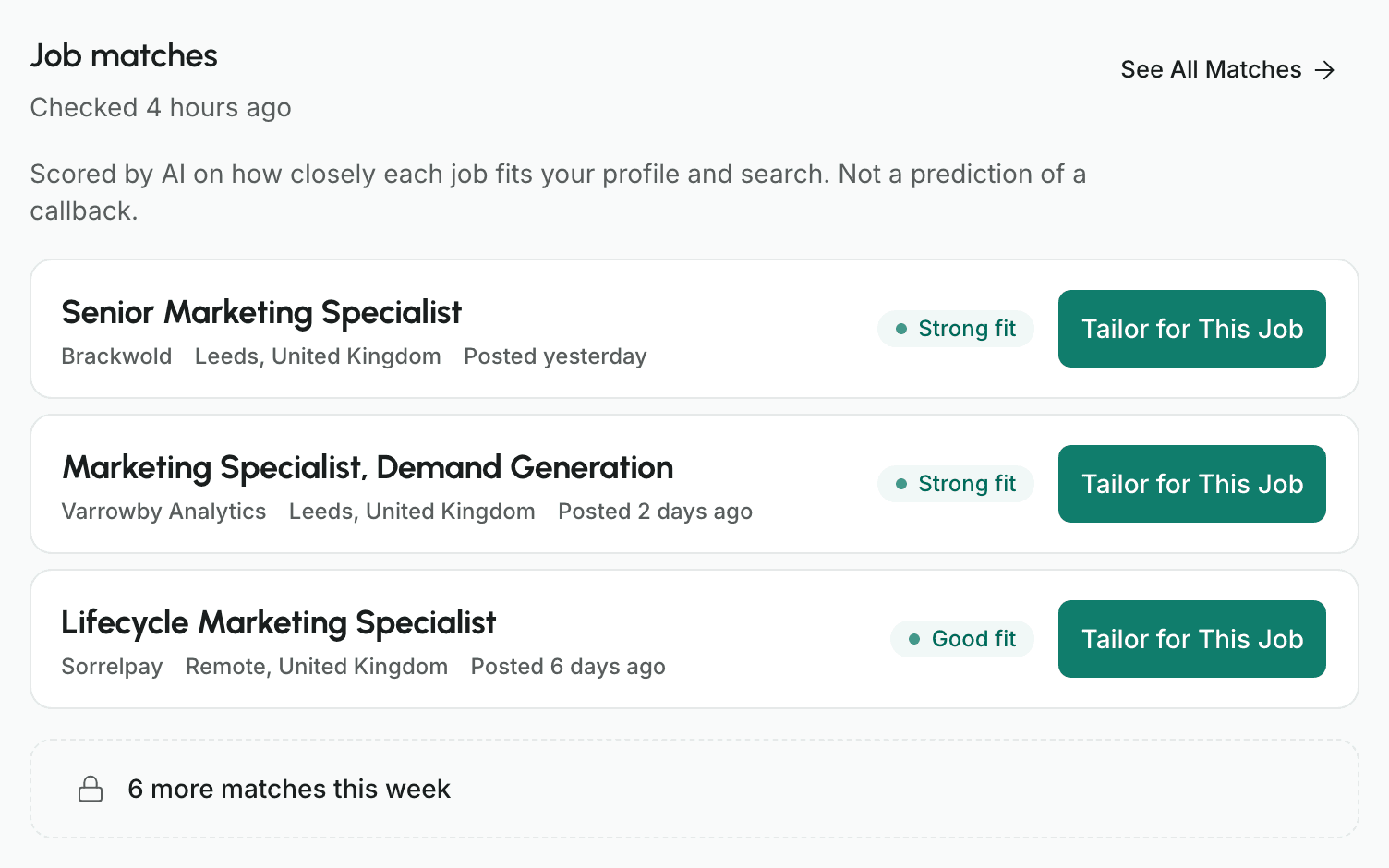
Xadaro reads the public job feeds employers publish and scores new listings that fit your search against your profile. The Free plan shows your top 3 job matches. Pro shows all of them.
The search you told us about
Your target role comes from your profile. Add where you'd work, the lowest salary you'd take, the type of role, and any companies or job-title words to leave out. If your search has few listings and no matches yet, the dashboard says so and suggests how to widen it.
A fit word, and the reasons for it
Each match is marked with a fit word, like Strong fit or Partial fit, scored by AI against your profile and search. Open one for a sentence on why, with its strengths and gaps. It is not a prediction of a callback.
From match to application
Tailor for This Job turns a match into an application, ready to tailor. On the Free plan it uses one of your applications for the month. You apply on the employer's own site, not through Xadaro.
Nothing about you goes to the feeds
No request we send to a feed carries your details or your search. To score listings for you, we send your profile, parts of your search, and the listings to the AI provider the privacy policy names. Employers hear from you when you apply, not before.
xadaro.com/dashboard
What happens to your history
You should know how your work history is handled before you upload it.
Questions before you start
The ones worth answering before you hand a service your work history.
A chat window gets whatever you paste. Xadaro sends your profile as structured data and breaks the posting into requirements first, so a rewrite can name the requirement it answers. You also get a coverage verdict on every requirement, and accept, edit, or reject controls on every rewrite. A chat window has none of that.
It's told not to, and on the surfaces that matter most a second pass reads the draft back looking for dates, figures, and company names your profile can't account for. An unsure suggestion keeps its place with a warning attached. An untraceable rewrite is dropped outright. The stronger guarantee is the one you hold: nothing reaches your CV unless you accept it, and you can edit any suggestion first.
Because the ATS score's rubric is published, not proprietary. Its 5 checks and their weights are set out above, and your report names every check and how it landed. It is arithmetic: re-running it on a CV you haven't touched cannot return a different number. The overall score in a CV review is a different kind of number, and because AI reads the writing it can move a point or two between identical runs.
No, and we don't train models on your content. The file itself goes to an AI provider once, when it is read into a profile. After that a request carries the profile rather than the file, with your nationality dropped from every one and any contact details in your headline or summary replaced before it is sent. Your own exports still show the real text.
No. Sign up with a name, an email address, and a password, confirm the email, and you're in. You enter payment details at checkout, when you choose to upgrade, and not before.
3 applications a month, each one with a tailored CV, a cover letter, and interview prep. 3 PDF exports a month, 3 saved CVs and 10 saved colour themes at a time, and 1 CV review a month. All 12 CV templates and the ATS score are on both plans. The AI features have their own monthly counts too, and the pricing page lists every one.
No, and it is not going to. You pick the role, you read the drafts, you decide what represents you, and you send it yourself. Nothing here submits an application form, signs into a job board, or writes to an employer on your behalf. What it removes is the work between finding the posting and being ready to send.
Anyone who wants the tool to write in an achievement it cannot see on your profile: it is built to refuse that. Anyone looking to fire off 200 generic applications, since every part of this works one posting at a time. Anyone who wants a heavily designed creative document, or a US federal resume. And anyone a decade or more into a career, who needs a different document and a more formal register than this tool writes in.
It reads the posting you give it, so it isn't tied to one industry. What it needs is real material to work from. A job, an internship, coursework, a side project, or freelance work all count.